Pages:  1 2 ... 5 6 7 8 9 10 11 12
Android – Page 10 – lytsing's Blog

Category: Android

  • Android 反编译中的 $assertionsDisabled

    很久以前看了一些apk经过反编译后得到的 .dex 格式文件,发现有assertionsDisabled, 不解记录之,今天翻看以前的工作日志,于是写个程序验证。

    .field static final $assertionsDisabled Z
    
    .method static <clinit>()V
    .limit registers 1
    .line 85
     16     const-class v0,org/lytsing/android/Assert
     17 ; v0 : Ljava/lang/Class;
     18     invoke-virtual  {v0},java/lang/Class/desiredAssertionStatus ; desiredAssertionStatus()Z
     19 ; v0 : Ljava/lang/Class;
     20     move-result v0
     21 ; v0 : single-length
     22     if-nez  v0,l1c6ac
     23 ; v0 : single-length
     24     const/4 v0,1
     25 ; v0 : single-length
     26 l1c6a6:
     27     sput-boolean    v0,org/lytsing/android/Assert$assertionsDisabled Z
     28 ; v0 : Z
     29     return-void
     30 l1c6ac:
     31     const/4 v0,0
     32 ; v0 : single-length
     33     goto    l1c6a6
     34 .end method

    在某个函数调用:

    110     .line 153
    111     sget-boolean v0, Lorg/lytsing/android/Assert;->$assertionsDisabled:Z
    112 
    113     if-nez v0, :cond_0
    114 
    115     array-length v0, p2
    116 
    117     array-length v1, p4
    118 
    119     if-eq v0, v1, :cond_0
    120 
    121     new-instance v0, Ljava/lang/AssertionError;
    122 
    123     invoke-direct {v0}, Ljava/lang/AssertionError;-><init>()V
    124 
    125     throw v0

    好像很复杂, 其实仅仅一行代码:

    assert conIds.length == stringIds.length;

    就产生了上面一坨的代码。

  • 小探 android版QQ空间(体验版)

    STONE说tx早有android版 QQ空间了,于是下载看看,感觉还行,功能太少了。不甘心,看看里面有什么好玩的,不会是个wrapper web的吧,于是决定反编译看个究竟。虽然大家都在骂腾讯,但不可否认的是,他们产品的用户体验做的很好, 搞android开发,也可以看看他们产品,好的界面设计,我们也可以拿来用。前文已经介绍了一些反编译apk的工具,搞软件开发的,至少有那么一点hack精神,学会反编译apk是Android应用程序开发的一项基本技能。

    UI

    界面是淡蓝色风格,也是我比较喜欢的风格,美工图片作图比较到位。看看下边的Tab吧,跟web一样了.

    android qzone 体验版

    开始琢磨一下,到底用什么东东做的?原来是自定义的tabTextStyle,里面还有非常多自定义的view, style,正应那句话:“优秀的组件都是自定义的”。

    personcenterheaderview.xml :

    <?xml version="1.0" encoding="UTF-8"?>
    <LinearLayout
        android:orientation="vertical"
        android:background="@drawable/homepageheadbg"
        android:focusable="false"
        android:layout_width="wrap_content"
        android:layout_height="wrap_content"
        xmlns:android="http://schemas.android.com/apk/res/android">
        <LinearLayout
            android:orientation="horizontal"
            android:id="@id/LinearLayoutUserMood"
            android:layout_width="fill_parent"
            android:layout_height="wrap_content"
            android:layout_weight="1.0">
            <LinearLayout
                android:gravity="center"
                android:background="@drawable/personhead"
                android:layout_width="wrap_content"
                android:layout_height="wrap_content"
                android:layout_marginLeft="4.0px"
                android:layout_marginTop="5.0px">
                <ImageView
                    android:id="@id/ImageViewUserIcon"
                    android:layout_width="49.0dip"
                    android:layout_height="49.0dip"
                    android:scaleType="centerCrop" />
            </LinearLayout>
            <LinearLayout
                android:orientation="vertical"
                android:id="@id/saynamegroup"
                android:background="@drawable/saydialog"
                android:layout_width="wrap_content"
                android:layout_height="wrap_content"
                android:layout_marginTop="8.0px"
                android:layout_marginRight="10.0px"
                android:layout_weight="1.0">
                <TextView
                    android:textSize="14.0px"
                    android:textColor="@color/black"
                    android:ellipsize="end"
                    android:id="@id/TextViewMood"
                    android:layout_width="wrap_content"
                    android:layout_height="wrap_content"
                    android:layout_marginLeft="2.0px"
                    android:layout_marginRight="2.0px"
                    android:maxLines="2"
                    android:layout_weight="1.0"
                    />
                <TextView
                    android:textSize="12.0px"
                    android:id="@id/TextViewTime"
                    android:layout_width="wrap_content"
                    android:layout_height="wrap_content"
                    android:layout_marginLeft="2.0px"
                    android:layout_marginTop="2.0px"
                    style="@style/unnoticeableTextStyle"
                />
            </LinearLayout>
        </LinearLayout>
        <LinearLayout
            android:gravity="center"
            android:orientation="horizontal"
            android:id="@id/LinearLayoutTabNav"
            android:layout_width="fill_parent"
            android:layout_height="wrap_content">
            <TextView
                android:gravity="center"
                android:id="@id/TextViewTabMood"
                android:layout_width="wrap_content"
                android:layout_height="36.0dip"
                android:text="心情"
                android:layout_weight="1.0"
                style="@style/tabTextStyle" />
            <TextView
                android:gravity="center"
                android:id="@id/TextViewTabBlog"
                android:layout_width="wrap_content"
                android:layout_height="36.0dip"
                android:text="日志"
                android:layout_weight="1.0"
                style="@style/tabTextStyle" />
            <TextView
                android:gravity="center"
                android:id="@id/TextViewTabAlbum"
                android:layout_width="wrap_content"
                android:layout_height="36.0dip"
                android:text="相册"
                android:layout_weight="1.0"
                style="@style/tabTextStyle" />
            <TextView
                android:gravity="center"
                android:id="@id/TextViewMessage"
                android:layout_width="wrap_content"
                android:layout_height="36.0dip"
                android:text="留言板"
                android:layout_weight="1.0"
                style="@style/tabTextStyle" />
        </LinearLayout>
    </LinearLayout>

    数据交换

    采用对象序列化,那么提供api的服务端也是用java写的了。

    代码组织

    搞了很多封装,写了N多个组件,不过看起来还清晰。

    命名规则

    不知道tencent有没有公司内部的规范文档,但我看到

    zhuye1.png
    zhuye2.png
    zhuye3.png

    android:id=”@id/ImageView01″
    android:id=”@id/ImageView02″

    之类的,感到很失望,浪费我时间来翻尸体。

    国际化

    在layout xml文件还出现
    android:text=”上传”,android:text=”取消” android:text=”请输入验证码” 之类的东西,为什么不用@string/xxx 呢?

    res/values/strings.xml 里写了很多中文,已经有了values-zh目录,为什么不写到里面呢?

  • 强悍的Android反编apk译软件 apktool

    apktool 下载地址: http://code.google.com/p/android-apktool/
    使用说明上面的链接也写非常清楚,需要注意的就是java是1.6版本的。

    前段时间整理了一个 wiki文档 http://lytsing.org/wiki/android/decompile.html ,简要列出了三个反编译工具:

    • smali
    • dedexer
    • dexdump

    今天下午与absurd老大聊了一下,他说apktool很强大,于是G它一把,看到youtubu有两个视频:

    Apktool Demo 1 – Editing HTC_IME resources

    Apktool Demo 2 – Smali improvements

    视频请自行翻墙观看。视频还有人留言:”Fantastic! Simply Awesome. Thanks so much, I will be looking for your dontate button” . Laugh!人家弄个软件也不容易啊。

    AndroidManifest.xml 一般用 AXMLPrinter2.jar 反编译后,勉强看懂,但还有一些字符串没翻译,apktool做的更彻底,一步到位。不过用AXMLPrinter2.jar反编译xml文件输出的结果很整齐美观。用Eclipse格式化layout的xml文件,结果不那么令人满意。在Jeff Sharkey的一篇博文中,他说Roman Guy会把xml格式化很漂亮,为此,曾经给Roman Guy发过邮件,至今没得到回复:(

    用dedexer反编译出来的ddx文件,参数名没显示出来,

    .method public static getSearchQueryForPublisher(Ljava/lang/String;)Ljava/lang/String;
    .limit registers 3
    ; parameter[0] : v2 (Ljava/lang/String;)

    apktool 反编译出来的smali文件,参数名都列出来了:

    .method public static getSearchQueryForPublisher(Ljava/lang/String;)Ljava/lang/String;
        .locals 2
        .parameter "publisher"

    用dedexer反编译出来的ddx格式文件,可读性会好一些。

    youtube的视频演示了如何修改代码,然后重新打包,签名发布。至于用来汉化,更是小case。同时,从另一个方面来讲,Android程序的安全问题也很是忧虑。

    apktool令人感到震撼,我那wiki页面信息全out了。

  • 一个封装 android.util.Log 的Log类

    在android代码的每个Activity,都不厌其烦的写:

    private static final String TAG = "MyActivity";

    然后需要打印的地方输入:

    Log.v(TAG, "index=" + i);

    写太多的TAG,也麻烦,如果不写TAG,用 this.toString() 也可行,不过还是一样,于是写个包装Log类,自动处理是哪个Activity,调用哪个函数,如下:

    /*
     * Copyright (C) 2010 Lytsing Huang http://lytsing.org
     *
     * Licensed under the Apache License, Version 2.0 (the "License");
     * you may not use this file except in compliance with the License.
     * You may obtain a copy of the License at
     *
     *      http://www.apache.org/licenses/LICENSE-2.0
     *
     * Unless required by applicable law or agreed to in writing, software
     * distributed under the License is distributed on an "AS IS" BASIS,
     * WITHOUT WARRANTIES OR CONDITIONS OF ANY KIND, either express or implied.
     * See the License for the specific language governing permissions and
     * limitations under the License.
     */
    
    package org.lytsing.android.util;
    
    /**
     * Wrapper API for sending log output.
     */
    public class Log {
        protected static final String TAG = "MyApplication";
    
        public Log() {
        }
    
        /**
         * Send a VERBOSE log message.
         * @param msg The message you would like logged.
         */
        public static void v(String msg) {
            android.util.Log.v(TAG, buildMessage(msg));
        }
    
        /**
         * Send a VERBOSE log message and log the exception.
         * @param msg The message you would like logged.
         * @param thr An exception to log
         */
        public static void v(String msg, Throwable thr) {
            android.util.Log.v(TAG, buildMessage(msg), thr);
        }
    
        /**
         * Send a DEBUG log message.
         * @param msg
         */
        public static void d(String msg) {
            android.util.Log.d(TAG, buildMessage(msg));
        }
    
        /**
         * Send a DEBUG log message and log the exception.
         * @param msg The message you would like logged.
         * @param tr An exception to log
         */
        public static void d(String msg, Throwable thr) {
            android.util.Log.d(TAG, buildMessage(msg), thr);
        }
    
        /**
         * Send an INFO log message.
         * @param msg The message you would like logged.
         */
        public static void i(String msg) {
            android.util.Log.i(TAG, buildMessage(msg));
        }
    
        /**
         * Send a INFO log message and log the exception.
         * @param msg The message you would like logged.
         * @param thr An exception to log
         */
        public static void i(String msg, Throwable thr) {
            android.util.Log.i(TAG, buildMessage(msg), thr);
        }
    
        /**
         * Send an ERROR log message.
         * @param msg The message you would like logged.
         */
        public static void e(String msg) {
            android.util.Log.e(TAG, buildMessage(msg));
        }
    
        /**
         * Send a WARN log message
         * @param msg The message you would like logged.
         */
        public static void w(String msg) {
            android.util.Log.w(TAG, buildMessage(msg));
        }
    
        /**
         * Send a WARN log message and log the exception.
         * @param msg The message you would like logged.
         * @param thr An exception to log
         */
        public static void w(String msg, Throwable thr) {
            android.util.Log.w(TAG, buildMessage(msg), thr);
        }
    
        /**
         * Send an empty WARN log message and log the exception.
         * @param thr An exception to log
         */
        public static void w(Throwable thr) {
            android.util.Log.w(TAG, buildMessage(""), thr);
        }
        
        /**
         * Send an ERROR log message and log the exception.
         * @param msg The message you would like logged.
         * @param thr An exception to log
         */
        public static void e(String msg, Throwable thr) {
            android.util.Log.e(TAG, buildMessage(msg), thr);
        }
    
        /**
         * Building Message
         * @param msg The message you would like logged.
         * @return Message String
         */
        protected static String buildMessage(String msg) {      
            StackTraceElement caller = new Throwable().fillInStackTrace().getStackTrace()[2];
    
             return new StringBuilder()
                    .append(caller.getClassName())
                    .append(".")
                    .append(caller.getMethodName())
                    .append("(): ")
                    .append(msg).toString();
        }
    }
    

    LogDemo.java:

    package org.lytsing.android.log;
    
    import org.lytsing.android.util.Log;
    import android.app.Activity;
    import android.os.Bundle;
    
    public class LogDemo extends Activity {
        /** Called when the activity is first created. */
        @Override
        public void onCreate(Bundle savedInstanceState) {
            super.onCreate(savedInstanceState);
            setContentView(R.layout.main);
            
            Log.i("index=" + 3);
        }
    }

    运行结果的Log信息,如下图:
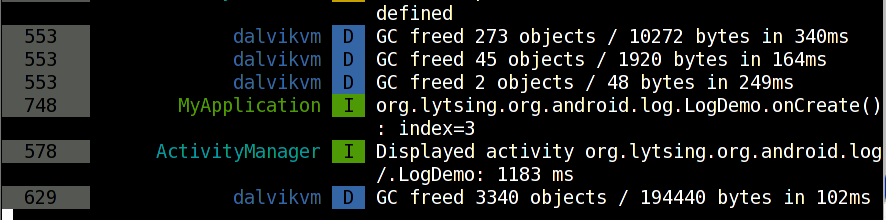
    需要的话,懒得复制粘贴,可以下载Log.java压缩文件包Log.tar.gz

    此外Android 代码风格指南 特别说明了,日志记录开销很大,应尽量少用,写规范可靠的代码,减少对debug的依赖。

  • 千万不要把Listview放在ScrollView里

    晚上逛了一下 eoe android论坛,见到一坨人千方百计的把ListView弄到ScrollView,还研究出一些策略,并引以为豪。eoe market也是用这样的设计,滚动条显示很诡异,时长时短。ListView 本来是不应该 放在 ScrollView 里的,Google员工 Roman Guy早已回复:“There is no need to put a ListView in a ScrollView since ListView already supports scrolling. Do NOT put a ListView inside a ScrollView. ListView already handles scrolling, you’re only going to run into trouble. “ 更详细的,大家可以看看他在 google i/o 上的ListView视频讲解。大家不要抱着侥幸的心理,要用正确的方法去做正确的事情。如果真的需要ListView不同行显示这样的设计,可以参考Mark Murphy提供的http://github.com/commonsguy/cwac-merge